# Find every invoice over €1,000
> Full-text search can find one invoice by its words. Typed fields let Suchi answer questions across the archive: amounts, dates, status, and other values that need type-aware comparisons.
Full-text search is good at finding the invoice that mentions a supplier. It is much worse at answering a question about invoices as a group.
Which renovation invoices exceed a thousand euros? Which contracts renew next month? Which medical bills are still missing a payment receipt? The words and numbers may all be visible in OCR text, but a search index does not know which number is the gross total, which date is the due date, or whether `1.234,56` is larger than `950.00`.
Suchi stores those values in typed custom fields. Supported electronic invoices can fill fields from structured data embedded in the PDF. A person, sidecar, API client, or configured automation can supply fields for other documents.
## Know where the invoice total came from
OCR turns a scanned PDF into searchable text. One invoice may contain several amounts, tax rates, account numbers, and dates. OCR can read those strings, but it cannot by itself establish which one is `invoice_total_gross`.
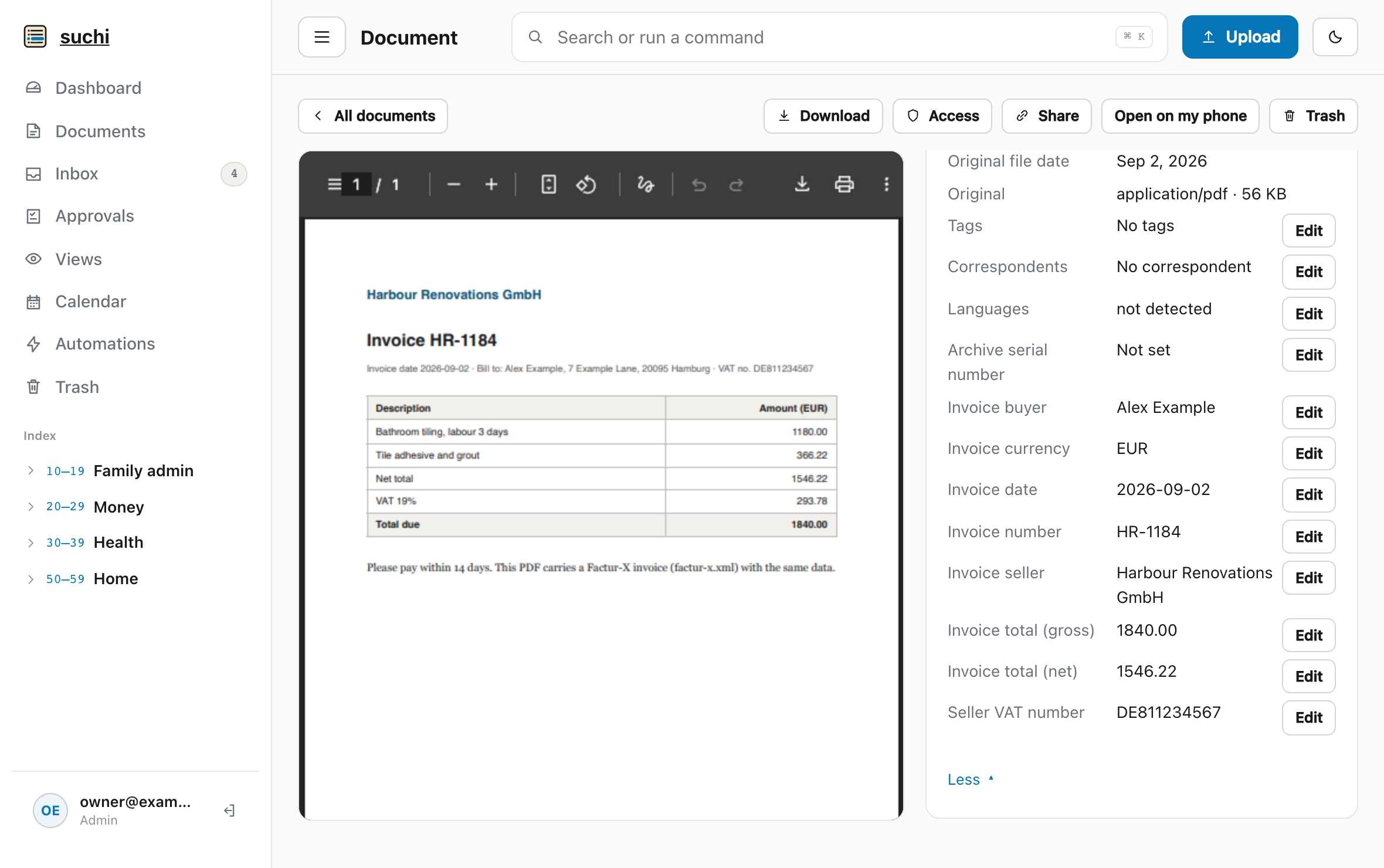
For supported electronic invoices, Suchi reads automatic fields from embedded **ZUGFeRD**, **Factur-X**, or **XRechnung** CII XML. The [format pipeline](https://docs.suchi.page/formats) can extract the invoice number, date, currency, totals, seller, and buyer. An arbitrary OCR scan does not populate those fields.
Fields read from the Factur-X XML inside the PDF. Each one stays editable.
The fields stay editable because structured input can still be wrong at its source. The visible PDF and the recorded value can be reviewed together before either drives a tax filing, insurance claim, or payment.
A scan without supported e-invoice XML takes another route. Define the field, then enter its value manually or supply it through a filesystem sidecar, API client, or configured automation. Suchi validates the value against the field’s declared type. An unknown field or invalid sidecar value rejects the intake instead of leaving a partly described document.
OCR gets the document into search. Comparisons become available after a value has been assigned to the correct typed field.
## Give each field a type
[Custom fields](https://docs.suchi.page/document-versions-and-links#typed-custom-fields) can be text, URL, number, monetary, date, yes/no, select, multi-choice, or a document link. The type shapes both the editor and the queries available later.
A monetary field stores a currency amount, and a date field stores a calendar date. A yes/no field accepts only those two values. Once a field has values, its type cannot be changed underneath them.
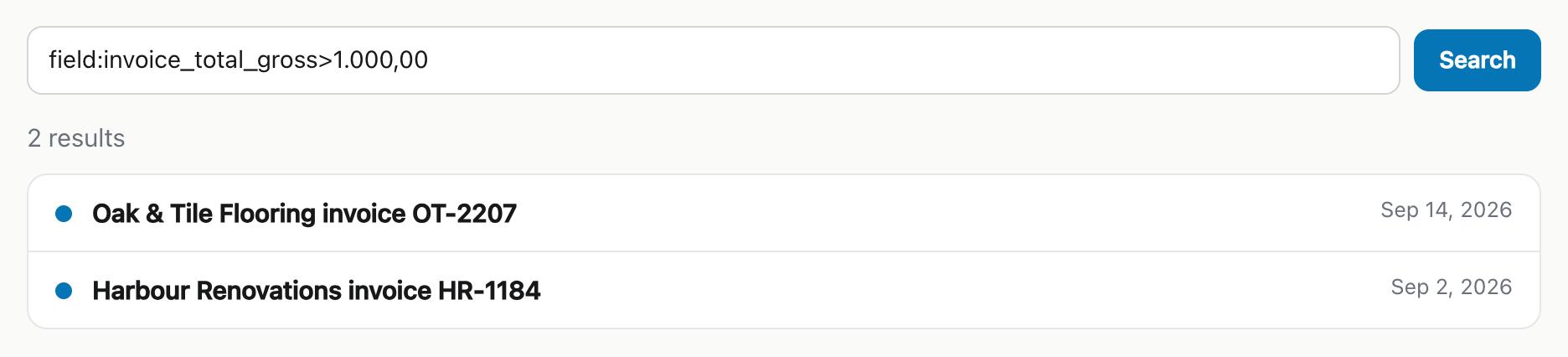
A spreadsheet may treat `€1,234.56`, `1.234,56 €`, and `EUR1234.56` as unrelated strings. Suchi’s query parser accepts local money syntax, including `1.234,56` and `€50`, then compares the parsed amount according to the monetary field’s type.
Input syntax and automatic extraction are separate. Understanding a local money format does not mean Suchi found that value in OCR text. It means a value supplied to a monetary field can be entered and queried without first translating it into one display convention.
## Query a typed field
The [query language](https://docs.suchi.page/query-language) resolves the exact field name and its declared type before applying an operator. Presence and value are different questions:
```text
has-field:"Payment receipt"
has-field:invoice_total_gross -has-field:"Payment receipt"
```
The first query finds documents carrying that field. The second finds e-invoices where it is absent.
A `field:` query asks about the value:
```text
field:"Invoice amount">=100
field:Status="Needs review"
field:Approved=yes
```
Number, monetary, and date fields support comparisons. Text, URL, select, and multi-choice values support equality. An invalid comparison, such as ordering the text values `Open` and `Closed`, is rejected instead of being converted into a misleading alphabetical result.
German number format, typed comparison: the two invoices over €1,000.
The same filters work in document lists, ranked search, saved views, calendar scopes, and authorised document tools. Permissions still apply within the query; a field does not broaden access to its document.
A saved view can keep “invoices over €1,000” ready for the next arrival. Another can collect documents with no payment receipt. When a new invoice arrives, Suchi evaluates its stored fields against those views.
## Verify the value against the PDF
The stored field still needs a source check. A value extracted from e-invoice XML can be wrong at its source. A value supplied manually or by automation can be wrong in transit.
Use the typed query to narrow the archive, then open each matching PDF before using the amount for a payment, claim, or tax return.