A household archive may still be needed decades after it was installed. By then the machine, deployment method, and person who set it up may all have changed.
Most web software can be replaced when maintenance becomes tiresome. An archive accumulates birth certificates, policies, invoices, contracts, and years of correspondence. Replacing the application may eventually be necessary, but the documents still need to remain recoverable.
Over that time span, process count, storage layout, backup scope, and export format determine how difficult recovery will be. Whoever restores the archive years later should not need to reconstruct a private infrastructure hobby before opening a policy.
Keep the running system small
The production Suchi architecture is one static Go binary with the browser app embedded. That process owns a SQLite database, immutable content-addressed blobs, and rebuildable filing views under one data directory. It does not require a separate database server, cache, or message broker.
The smaller service count reduces the number of components that can update or fail independently. Starting Suchi does not also require PostgreSQL, Redis, and a task-worker fleet. An update replaces one program while preserving the data directory.
Document conversion can still use external tools such as Tesseract, Poppler, qpdf, ImageMagick, ocrmypdf, or converters for office and mail formats. These are optional capabilities chosen for the formats an installation needs.
A missing converter can stop one processing step without making stored originals unavailable. A database outage stops the archive itself.
Know what each stored copy is for
The data directory contains three kinds of stored state with different recovery uses: the database, content-addressed blobs, and a rendered filing tree.
Original and derived bytes live in an immutable content-addressed store. A hash identifies the stored bytes, so document versions can refer to the same object without rewriting it. The blob path does not carry the document’s title, owner, permissions, or filing meaning.
SQLite carries that identity and meaning. It stores metadata, users, permissions, document and version relationships, jobs, full-text search, and audit state. A blob without the matching database cannot reconstruct those contracts.
The rendered/ tree is the readable filing view. It gives live documents names and paths based on the selected filing layout, so a stopped archive is easier to inspect with an ordinary file manager. The server updates the tree as document state changes.
The default layout goes area, then category, then the year from the document’s own date, so a birth certificate from 1988 and a policy from last year each sit under their own year.
rendered/
├── 00-09 System index
│   └── 00.00 archive.huml
├── 10-19 Family admin
│   ├── 11 Family IDs
│   │   ├── 1988
│   │   │   └── 1988-02-03 Birth certificate Alex Example__2.pdf
│   │   ├── 2019
│   │   │   └── 2019-05-14 Passport Alex Example__14.pdf
│   │   └── 2024
│   │       └── 2024-07-22 Address proof letter__1.pdf
│   ├── 12 Insurance
│   │   ├── 2024
│   │   │   └── 2024-10-02 Health policy 2024–25__7.pdf
│   │   ├── 2025
│   │   │   └── 2025-10-04 Health policy 2025–26__8.pdf
│   │   └── 2026
│   │       └── 2026-06-12 Motor policy 2026–27__13.pdf
│   └── 15 Education
│       └── 2012
│           ├── 2012-06-30 Final transcript__21.pdf
│           └── 2012-07-14 Degree certificate__5.pdf
├── 20-29 Money
│   ├── 21 Bank & card statements
│   │   └── 2026
│   │       ├── 2026-08-02 Statement July 2026__19.pdf
│   │       ├── 2026-09-02 Statement August 2026__20.pdf
│   │       └── 2026-09-05 Card statement August 2026__4.pdf
│   ├── 23 Income tax
│   │   ├── 2025
│   │   │   └── 2025-07-28 Income tax return 2024–25__9.pdf
│   │   └── 2026
│   │       └── 2026-07-30 Income tax return 2025–26__10.pdf
│   └── 24 Loans
│       ├── 2015
│       │   └── 2015-04-20 Home loan sanction letter__12.pdf
│       └── 2025
│           └── 2025-03-03 Home loan closure certificate__11.pdf
├── 30-39 Health
│   └── 31 Medical records
│       ├── 2025
│       │   └── 2025-11-18 Discharge summary__6.pdf
│       └── 2026
│           └── 2026-02-09 Blood test report__3.pdf
└── 50-59 Home
    ├── 51 Utilities
    │   └── 2026
    │       ├── 2026-09-01 Electricity bill August 2026__15.pdf
    │       ├── 2026-10-01 Electricity bill September 2026__16.pdf
    │       └── 2026-10-03 Water bill Q3 2026__22.pdf
    └── 52 Housing
        ├── 2015
        │   └── 2015-05-11 Sale deed Plot 17__18.pdf
        └── 2026
            └── 2026-04-01 Rental agreement Flat 4B__17.pdf
Each entry is a link into blobs/. Copying rendered/ by itself copies links, not documents.
The rendered tree is a rebuildable view. If it is omitted or the data directory moves, Suchi can recreate it from the database and blobs with a refile operation.
With the server stopped, a current rendered tree gives a non-technical person a readable path to the documents. The database is still required for exact identity, history, and access. The content-addressed store holds the original bytes.
Back up the whole instance to resume exactly
Suchi keeps persistent application state under DATA_DIR: the SQLite database and live WAL files, blobs, rendered projection, built-in database snapshots, credential key, and optional configuration.
A complete backup captures the whole instance. It needs a consistent database snapshot together with the blob tree, credential key, and operator configuration. A live filesystem snapshot must capture the database and WAL atomically. Copying suchi.db at one moment and its WAL or blobs later can combine pieces from different states.
The built-in scheduled snapshots contain only the database. They do not include document bytes or the credential key, both of which are required for disaster recovery.
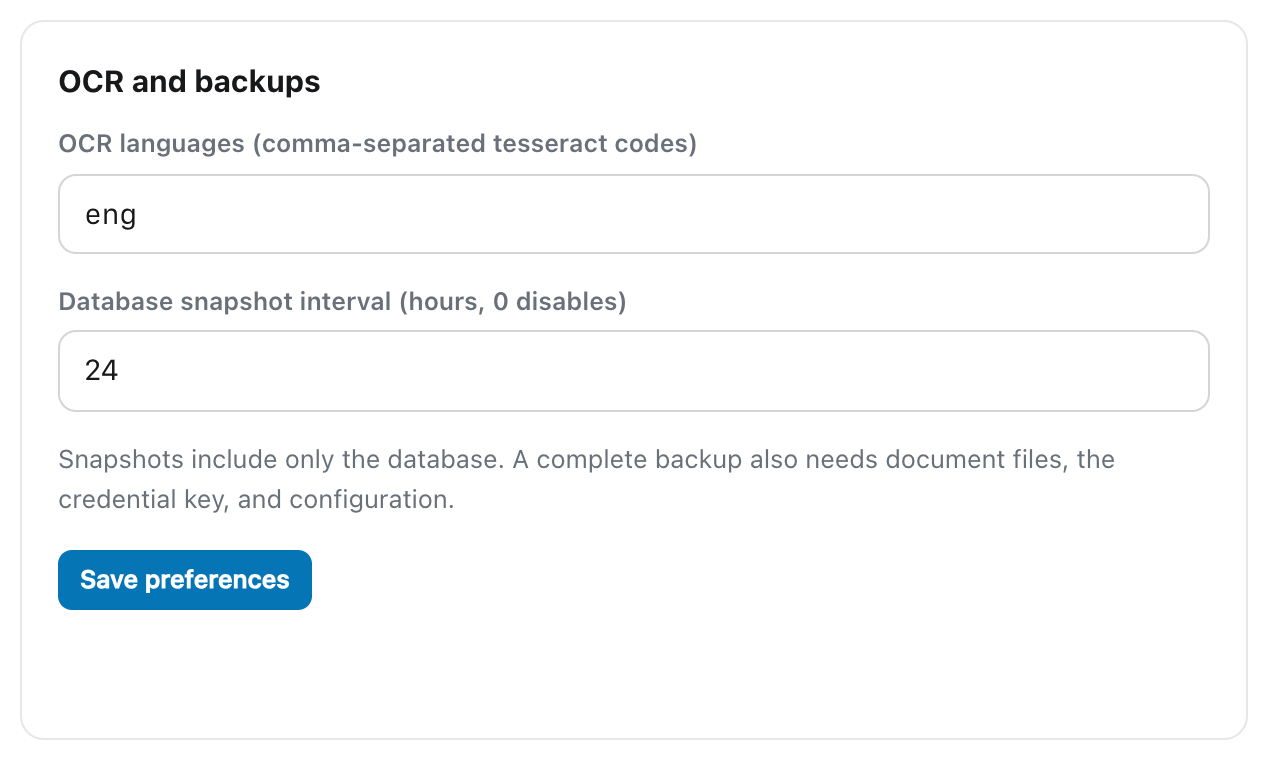
The cleanest manual boundary is to stop Suchi and every other archive writer, copy the complete directory, then start the service again. Filesystem snapshots such as ZFS, btrfs, or LVM can capture the same boundary while the service runs if they include the whole directory atomically. Test either method by restoring to a separate location and checking readiness.
A whole-directory restore preserves users, memberships, permissions, document IDs, versions, links, review history, and audit state. Database migrations are one-way. Rolling back therefore means restoring the complete pre-upgrade directory with the older binary, not pointing old code at a newer database.
Use a takeout to move documents elsewhere
A native takeout writes live original files, JSON sidecars, and selected filing-system data. The result is a set of ordinary files with a manifest. It can be inspected without running the original instance and reingested into another prepared Suchi archive.
Use a takeout for migration or inspection outside the running instance. Selected metadata, including an archive serial number, can travel beside the original file.
A takeout is not an exact restore. It does not preserve the full database graph of IDs, memberships, ACLs, version families, automation state, notes, and audit history. Reingestion can also reject a document whose retained archive serial number collides with the target.
Keep both forms:
- tested whole-data-directory backups for exact recovery of the running archive;
- periodic takeouts for ordinary-file portability and a route into another system.
Name both in the recovery notes because they are not interchangeable.
Document both recovery routes
Recovery notes should state which backup contains the complete data directory and where takeouts are kept. Restoring the same archive starts with the whole-directory backup. Moving the documents elsewhere starts with a takeout and its sidecars.