Somewhere on your disk there is a folder tree you have been tending for years. Money, then Insurance, then the insurer, then the year. Or the year first and everything under it. Maybe it follows a numbering scheme you found one night and never regretted. You can find things in it without looking, because you built it, corrected it, and carried it across three laptops.
Most document systems ask you to give that up on the first day. Files go in, get renamed to internal IDs, and settle into a store only the application can read. The tree with fifteen years of decisions in it becomes “the old folder”. I think that demand, more than any missing feature, is why so many people with a working system never move to an archive at all.
Suchi keeps your structure. It can maintain a readable folder tree on disk, and you decide what that tree looks like. If you keep everything in one folder, keep it that way and let the filename carry the date, sender and title. If your habit is a tree, Suchi rebuilds it level by level, and new documents land where you would have put them by hand.
How a folder layout works
A folder layout is one line of path template:
{{ jd.category.name }}/{{ correspondent }}/{{ created_year }}/{{ created }} {{ title }}Suchi fills each {{ … }} from the document: the category it is filed under, who sent it, the year and date on the document, and its title. Tags, the owner and the archive serial number are available too. You leave the extension off. Suchi adds the one that matches the file: .pdf for the searchable copy it makes of a scan, otherwise the original’s own, such as .eml or .docx. Layouts live under Settings → Archive configuration → Advanced → Folder layouts, and the editor renders a sample path as you type.
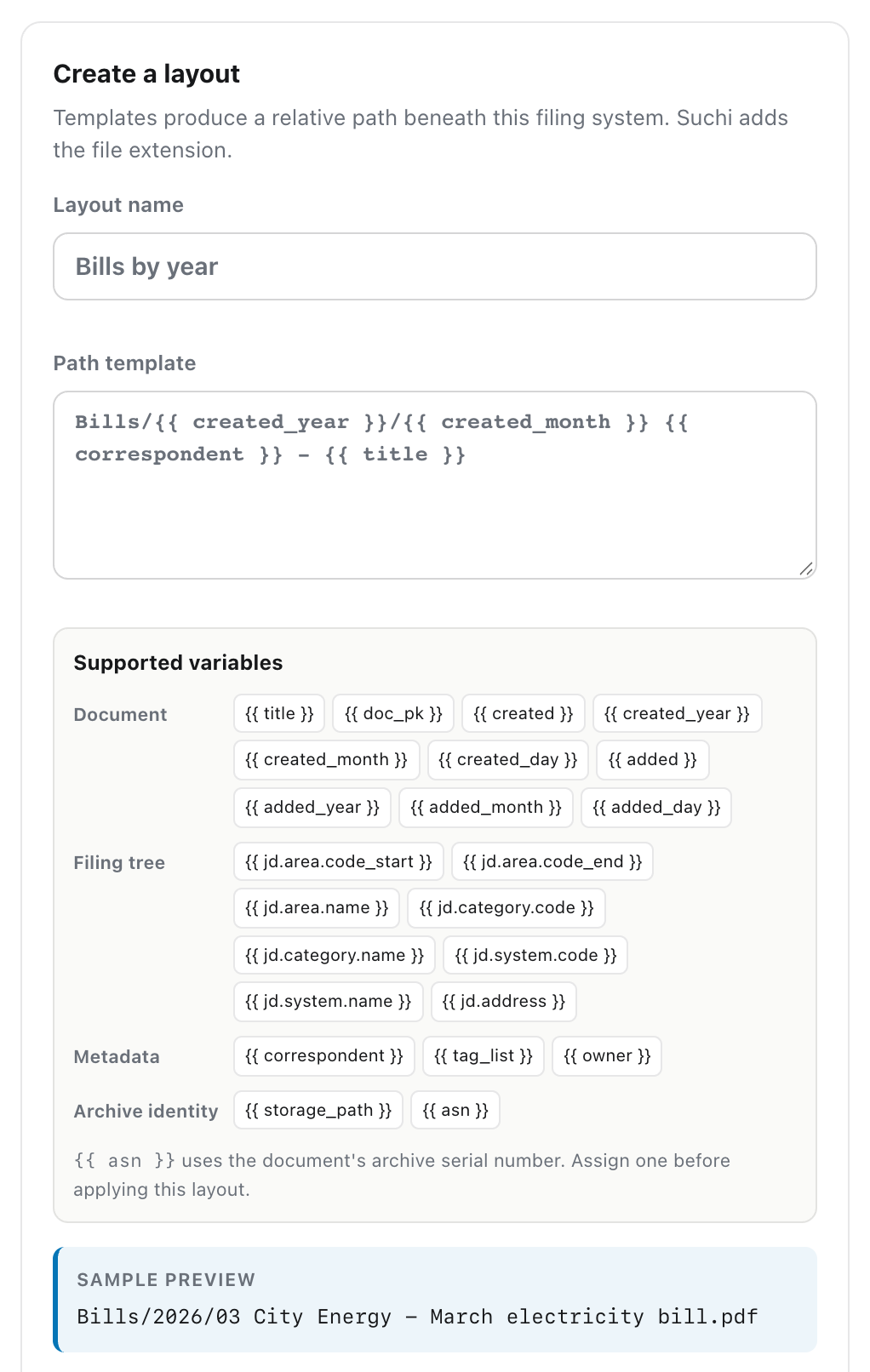
Suchi writes these folders itself and keeps them current. Retitle a document, file it under another category, set or change its sender, or give it another layout, and its file moves. Edit a layout’s template and every document using that layout moves to the new path. Nothing has to be exported or re-synced. Each file in the tree is a link to the stored document, the searchable copy when Suchi made one and the original otherwise, so the tree takes no extra space and nothing stored is ever renamed or rewritten.
A layout only changes where a document appears on disk. Inside Suchi it stays filed in its category of the filing tree, so the sidebar, jd: search, rules and permissions work the same whichever layout you pick.
Rules decide which documents use which layout. An automation can file a document and assign its layout in the same step, and suchi refile runs your rules again over everything already in the archive. A document without a layout follows the filing tree, so the archive is browsable from the first upload.
The examples below use the same twelve household documents: bank statements, two insurers, utility bills, a rental agreement, a renovation invoice and a pharmacy receipt.
Simple: one folder
This suits people who never made folders. Everything went into one place, and they found things by sorting or searching the filenames.
Documents/{{ created }} {{ correspondent }} - {{ title }}rendered/
└── Documents
├── 2025-10-04 Harbour Health - Health policy 2025–26.pdf
├── 2026-04-01 Jordan Sample - Rental agreement Flat 4B.pdf
├── 2026-06-12 Meridian General - Motor policy 2026–27.pdf
├── 2026-08-01 Lakeside Power - Electricity bill July 2026.pdf
├── 2026-08-02 Northwind Bank - Statement July 2026.pdf
├── 2026-09-01 Lakeside Power - Electricity bill August 2026.pdf
├── …
└── 2026-10-09 Greenleaf Pharmacy - Pharmacy receipt October 2026.pdfThe date comes first and is written year-month-day, so sorting the folder by name sorts it by date in any file manager. Typing Northwind into the file manager’s search finds every statement, because the sender is part of every name.
The categories don’t disappear. Each document is still filed in Suchi, and a search for jd:51 there still returns every utility bill. They just don’t become folders.
A document whose sender isn’t known yet gets a gap where the sender goes. When the filing loop or a person sets the sender, the file is renamed in place.
Medium: the tree you already have
This suits people whose old tree went by kind of document, then by who sent it, then by year:
{{ jd.category.name }}/{{ correspondent }}/{{ created_year }}/{{ created }} {{ title }}rendered/
├── Bank & card statements
│ └── Northwind Bank
│ └── 2026
│ ├── 2026-08-02 Statement July 2026.pdf
│ └── 2026-09-02 Statement August 2026.pdf
├── Insurance
│ ├── Harbour Health
│ │ ├── 2025
│ │ │ └── 2025-10-04 Health policy 2025–26.pdf
│ │ └── 2026
│ │ └── 2026-10-05 Health policy 2026–27.pdf
│ └── Meridian General
│ └── 2026
│ └── 2026-06-12 Motor policy 2026–27.pdf
└── Utilities
└── Lakeside Power
└── 2026
├── 2026-08-01 Electricity bill July 2026.pdf
└── …The first level is the category name and the second is the sender’s name. To reproduce an old tree, use the same names for those categories and senders.
A document without a sender skips that level and sits straight in Insurance/2026/. One that hasn’t been filed yet sits under Inbox/. Both move to their full path once the missing fact is known, so the tree stays tidy without anyone fixing it.
Complex: reorganise one part, keep the rest
Most people’s habits aren’t uniform. Policies and statements make sense by sender, but bills are easier by month, because the question is usually “did we pay October?”. Suchi handles that with a second layout for bills only:
Bills/{{ created_year }}/{{ created_month }} {{ correspondent }} - {{ title }}A rule sends bills to it: when a new document lands and its title matches bill, file it in 51 · Utilities and use the folder layout Bills by year. Each document has one layout, so the bills leave the category tree and everything else stays where it is. Running suchi refile once applies the rule to the bills already in the archive.
rendered/
├── Bank & card statements
│   └── Northwind Bank
│       └── 2026
│           └── …
├── Bills
│   └── 2026
│       ├── 08 Lakeside Power - Electricity bill July 2026.pdf
│       ├── 09 Lakeside Power - Electricity bill August 2026.pdf
│       ├── 10 Lakeside Power - Electricity bill September 2026.pdf
│       ├── 10 Lakeside Water - Water bill Q3 2026.pdf
│       └── 11 Lakeside Power - Electricity bill October 2026.pdf
├── Housing
│   └── …
└── Insurance
    ├── Harbour Health
    │   ├── 2025
    │   │   └── 2025-10-04 Health policy 2025–26.pdf
    │   └── 2026
    │       └── 2026-10-05 Health policy 2026–27.pdf
    └── Meridian General
        └── …
The October bill arrived after the change. The rule filed it and gave it the bills layout before anyone looked at it, and because its document date is 1 November it went into 11. Insurance/Harbour Health/2026 didn’t move, so the path to last year’s policy is the same one you used yesterday.
Changing your mind later
A hand-built tree can fit well and still be expensive to change. Moving a level means moving every file by hand and fixing the shortcuts and bookmarks that point into it. Most people leave the old structure in place even after it stops fitting.
In Suchi the documents carry their own facts, and the folders are computed from them. Deciding that year-first beats category-first is a one-line edit to the main layout:
{{ created_year }}/{{ jd.category.name }}/{{ correspondent }}/{{ created }} {{ title }}rendered/
├── 2025
│ └── Insurance
│ └── Harbour Health
│ └── 2025-10-04 Health policy 2025–26.pdf
├── 2026
│ ├── Bank & card statements
│ │ └── …
│ ├── Housing
│ │ └── …
│ ├── Insurance
│ │ ├── Harbour Health
│ │ └── Meridian General
│ └── Medical billing
│ └── …
└── Bills
└── 2026
└── …Every document on that layout moved in one pass, and the bills kept their own layout, so they stayed in Bills/. If you edit the filing tree itself instead, its Refile existing documents after the change option re-lays the archive the same way.
Moving to Suchi’s numbered filing tree
All three layouts are optional. Without one, every document follows Suchi’s own filing tree, which is built on the Johnny.Decimal system: numbered areas, numbered categories, then the year. For the same documents it looks like this:
rendered/
├── 10-19 Family admin
│   └── 12 Insurance
│       ├── 2025
│       │   └── 2025-10-04 Health policy 2025–26__1.pdf
│       └── 2026
│           ├── 2026-06-12 Motor policy 2026–27__3.pdf
│           └── 2026-10-05 Health policy 2026–27__2.pdf
├── 20-29 Money
│   └── 21 Bank & card statements
│       └── 2026
│           ├── 2026-08-02 Statement July 2026__10.pdf
│           └── 2026-09-02 Statement August 2026__11.pdf
└── 50-59 Home
    ├── 51 Utilities
    │   └── 2026
    │       ├── 2026-08-01 Electricity bill July 2026__5.pdf
    │       └── …
    └── 52 Housing
        └── …
I recommend ending up here, even if you start with your own layout. The numbers make the folders sort the same way in every file manager, whatever the names. They are the same numbers Suchi shows in its sidebar index and accepts in search, so 12 Insurance on disk and jd:12 in the app point at one place. The number after __ is the document’s number in Suchi, so no two files ever share a name, and any file can be traced back to its record. And the tree is defined once, in the filing tree, so there is no template of yours to keep correct as the archive grows. When someone else has to find a policy in ten years, numbered folders with plain names are the easiest thing to hand them. Why Suchi files every document under a number makes the full case.
Moving there doesn’t require a big switch. First take the folder-layout action out of any rule that uses it, so new documents stop being assigned to it. Then delete the layout under Folder layouts. Its documents return to the numbered tree straight away, and nothing else changes. You can do this one layout at a time: keep Bills by year while you get used to 51 Utilities, and drop it when the numbers feel like your own.
Johnny.Decimal is a trademark of Coruscade Pty Ltd. Suchi is an independent project and is not affiliated with or endorsed by Johnny.Decimal.
What a layout depends on
A document lands in your Insurance folder only if Suchi knows it is insurance, so a layout is only as good as the filing behind it. That is the job of the filing loop: rules for what can be known exactly, local matching for the rest, and review for anything uncertain. The first few documents from a new sender may wait for review before the next one can be filed automatically.